The browser: from a URL to an interactive page
Follow navigation, resource discovery, rendering, and main-thread work to locate the dependency delaying a useful page.
HTML describes structure, CSS describes presentation, and JavaScript supplies behavior. The browser loads these independently authored inputs and turns them into an interactive document. A framework can generate them, but it cannot remove their network, CPU, memory, and accessibility costs.
The web began with linked documents. Forms added remote interaction; scripting added local behavior. That history explains the platform's durable features: every resource has an address, navigation survives refresh, and a useful document can exist before application code runs. Understanding those contracts makes modern rendering choices easier to judge.
A navigation is a dependency graph
Entering a URL can require resolving a host, opening a connection, negotiating TLS, receiving a response, and following redirects. Cached DNS answers, reused connections, a service worker, or an HTTP cache can skip work. HTTP/2 multiplexes streams over TCP; HTTP/3 uses QUIC over UDP. Neither makes a slow application response instantaneous, and multiplexing does not give a connection infinite bandwidth.
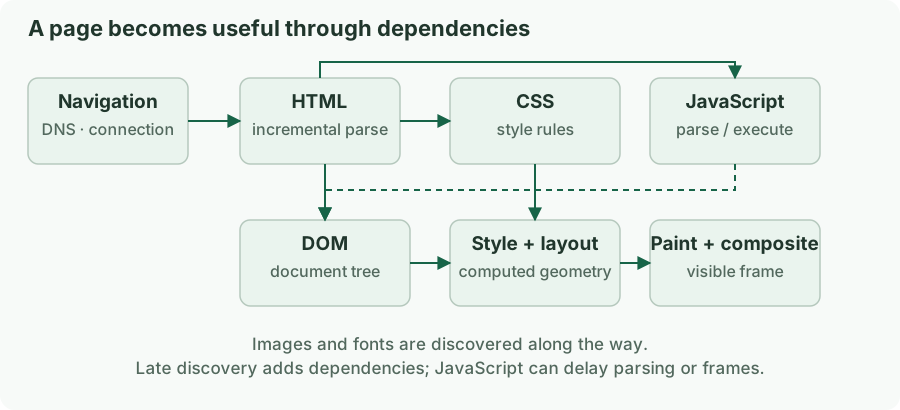
The response's first byte is only the start. The browser incrementally parses HTML and discovers styles, scripts, images, and fonts. A preload scanner may discover resources ahead of the main parser. A hero image referenced only after a script executes sits behind that script in the dependency graph, even if the image itself downloads quickly.
This document gives the browser early information about its critical resources:
<!doctype html>
<html lang="en">
  <head>
    <meta charset="utf-8">
    <meta name="viewport" content="width=device-width, initial-scale=1">
    <title>Order history</title>
    <link rel="stylesheet" href="/assets/orders.css">
    <script type="module" src="/assets/orders.js"></script>
  </head>
  <body>
    <main>
      <h1>Order history</h1>
      <img src="/images/orders-guide.webp" width="720" height="400"
           alt="Where to find the order number on a delivery receipt">
    </main>
  </body>
</html>
The doctype selects standards mode. The viewport declaration avoids a legacy wide layout viewport on mobile. Dimensions reserve image space. A module script is deferred by default; its dependency graph still needs downloading and evaluation. Use preload or high fetch priority only for resources measured to be critical; unnecessary priorities compete with the resources that matter.
Parsing, execution, and rendering overlap
HTML parsing creates the DOM. Stylesheets are parsed into rules used during style calculation. The browser computes geometry during layout, records drawing work during paint, and composites the result into frames. These are dependencies, not a strict one-time waterfall: later updates repeat some stages, and rendering can happen before the document finishes downloading.
A parser-inserted classic script without async or defer pauses the parser while it loads and executes. An async script executes when available, so execution order is unsuitable for ordered dependencies. A deferred classic script waits for parsing and preserves document order among deferred scripts. A module follows module dependency ordering. Stylesheets can delay rendering and can also delay scripts that need styles to be ready.
DOMContentLoaded concerns parsing and deferred script execution; load waits for additional dependent resources. Neither event proves that the main task is usable. A dashboard may fire both events and still show an API spinner. Define useful readiness in product terms: the user can inspect the requested order and perform the next action.
A UI change has several possible costs
Changing text can require layout if geometry changes. Changing a background can require paint. Updating a transform may be handled through compositing when the engine can use an existing layer, but promotion is not guaranteed and layers consume memory.
The expensive failure is often repeated forced layout. In this browser fragment, reading geometry after a write can force pending style and layout work:
const cards = [...document.querySelectorAll(".card")];

// Read geometry together before changing styles.
const widths = cards.map(card => card.getBoundingClientRect().width);

requestAnimationFrame(() => {
  cards.forEach((card, index) => {
    card.style.setProperty("--measured-width", `${widths[index]}px`);
  });
});
Batching reads and writes reduces avoidable synchronization. It does not make measuring thousands of elements free. Prefer CSS layout when the browser can express the relationship directly. requestAnimationFrame schedules work before an upcoming repaint opportunity; a heavy callback can still delay that frame.
The main thread is a shared budget
On a typical page, JavaScript, event handling, style, and much layout work compete on the main thread. Network transfer happens elsewhere, but processing a large response and building a large DOM still uses CPU. A fast API with a 50 MB JSON response can produce a poor interaction on a low-end phone.
Workers move suitable computation away from the document's main thread. They cannot manipulate the DOM directly, and transferring or cloning data has a cost. Compositing and rasterization also involve other browser threads and processes; saying “the browser is single-threaded” hides the actual bottleneck. The useful question is which work blocks the user-visible critical path.
Browser processes provide isolation boundaries, but application code should not assume every tab, origin, or iframe gets a particular process layout. Rely on web security contracts rather than a guessed engine implementation.
Inspect the dependency that delayed the outcome
For a slow first view, inspect document timing, redirects, resource discovery, transfer size, and main-thread work together. A 900 ms blank screen can come from a slow server, a script-generated image URL, render-blocking CSS, or a long initialization task. These require different fixes.
For a slow interaction, record the interaction and inspect input delay, handler duration, style/layout, and presentation. For a growing tab, compare memory after repeated open/close cycles and garbage collection rather than treating one heap sample as a leak.
Keep a specific hypothesis: “the product image is discovered after hydration” is testable; “we should use SSR” is a proposed implementation. The browser pipeline lets you establish the first before committing to the second.